“Pentera helps us prioritize what truly matters and gives us confidence we are covering our global environment continuously.”
“Seeing a domain admin account cracked in production changed how we view internal exposure.”
“Pentera helped us advance our red team and continuously improve penetration testing.”
“Pentera makes it easier to focus on what is truly exploitable instead of chasing long vulnerability lists.”
“In a complex, large-scale environment, Pentera delivers the speed and visibility security teams need.”
“Pentera amplified our team’s performance and delivered measurable value to upper management.”
"Pentera allows us to tailor testing to each service, reduce time and costs, and shift our focus from simply finding vulnerabilities to actively helping our teams fix them.”
Rubén Alonso | Head of Secure
Development Unit, Telefonica
“I don’t think we’d be able to advance our red team without Pentera. If you’re looking to improve penetration testing, I would definitely recommend it.”
The Shift from Port 445 to Port 135 in Cybersecurity
PsExec shows how legitimate administrative tools can become highly effective attack mechanisms when abused by adversaries. The danger is not just the tool itself, but the trusted protocols and ports that allow remote execution and lateral movement to blend into normal operations. Organizations need to monitor these pathways closely and validate that overlooked exposures, such as port 135, are not creating easy paths for compromise.
Yuval Lazar
Technical Product Manager & Senior Security Researcher at Pentera
13 Sep 2023
If we could nominate a command-line utility for an award, PsExec would undoubtedly win the “Most Useful” category. This tool enables administrators to run remote commands as if they were on a local machine. Unfortunately, network administrators aren’t the only ones who love PsExec—so do hackers.
Sysinternals 101: Understanding PsExec
Windows Sysinternals offers a suite of tools for managing, diagnosing, troubleshooting, and monitoring Microsoft Windows environments. Among these tools is PsExec, a command-line utility designed to replace older tools like telnet, which required opening ports and introduced security vulnerabilities. PsExec makes it easy to launch interactive command prompts, run as a local system on remote computers, and execute commands across multiple systems—all without installing client software.
How PsExec Works
Before diving into PsExec, let’s briefly discuss Remote Procedure Calls (RPC). RPC is a protocol that communicates with the operating system and relies on transport protocols like TCP or SMB to carry messages between programs. It helps users create, manage, and execute services within an operating system.
Typically, PsExec uses the SMB protocol and runs on port 445. It leverages SMB to enumerate writable shares, upload an executable file, and supply command outputs to users.
Running PsExec requires three key components:
A computer name
Valid credentials
A command to execute
Let’s see it in action.
Running PsExec: A Practical Example
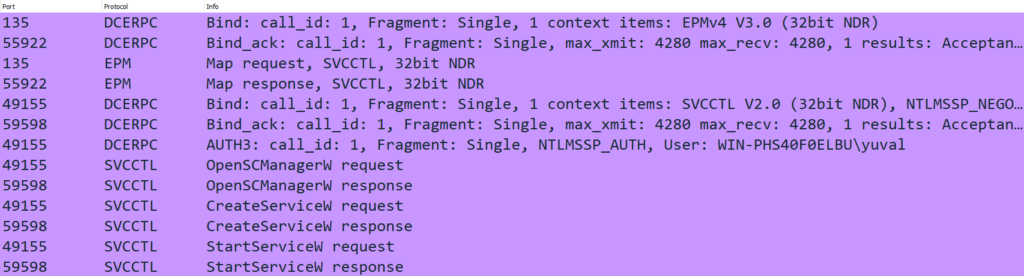
PsExec often uses the $Admin shared folder, a common configuration on most Windows systems. It uploads an executable called PSEXESVC.exe via SMB, creates a Windows service on the remote machine using RPC, and then starts the service to run a program with the specified arguments.
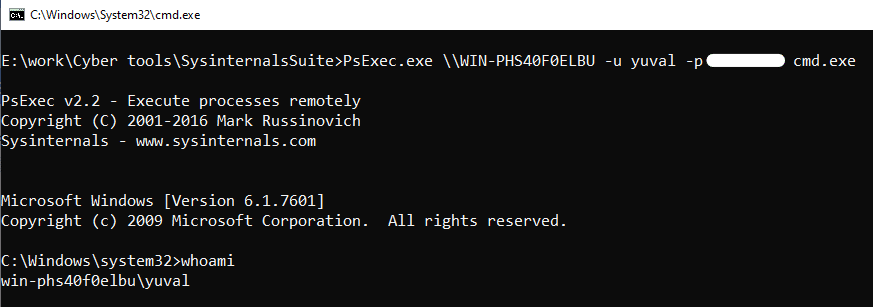
For example, running cmd on a remote machine via PsExec involves providing a username, password, and command. This method demonstrates the tool’s power but also highlights potential vulnerabilities.
PsExec Meets Impacket: Enhancing Functionality
PsExec’s popularity has inspired alternative implementations, such as the Impacket Library by SecureAuth Labs. This Python-based collection of tools extends PsExec’s capabilities while maintaining similar functionality. Impacket uses SMB connections and DCE/RPC methods like SVCCTL to manage Windows services.
Key features of Impacket’s PsExec implementation include:
Running custom binary files
Generating random service names for execution
Automatically cleaning up after command execution
This implementation also uses an SMB connection and is based on port 445. It uses DCE/RPC methods such as the SVCCTL named pipe, which is used to manage Windows services via the SCM (Service Control Manager).
The basics of this implementation work much the same as the PsExec Windows tool, with just a few tweaks. The Impacket Library implementation of PsExec has the option to:
Supply a file to run. If we do not provide a binary file, then the default binary that the program runs is taken from RemCom, another open source project.
Provide a service name. If not provided, a random 4 letter word is used.
Once the user exits the console or the command has finished, SCM is called to close the service, the exe file is deleted and the SMB connection is disconnected. These enhancements make PsExec even more versatile—but also more dangerous in the wrong hands.
Moving Beyond Port 445: The Role of Port 135
What happens if port 445 is blocked? Using Impacket, we developed a PsExec implementation that relies solely on port 135. By utilizing DCE/RPC calls, this version creates and starts services without SMB. While it doesn’t offer running output, it demonstrates how attackers can bypass traditional defenses.
Using the Impacket infrastructure, we were able to build an implementation of PsExec based solely on port 135. We found that the SMB protocol is used to upload the binary and to forward the input and output, but as we explained, the commands are executed using DCE/RPC calls, and the processes will run without consideration of the output.
By using RPC calls we can create a service that will run a command of our choice, and start the service, without the use of port 445. This implementation does not offer a running output, but there are ways to overcome this.
Here’s a snippet of code showcasing how to create a DCE/RPC connection without using SMB. This approach underscores the need to address security risks associated with overlooked ports like 135.
Conclusion: Don’t Underestimate Port 135
Security teams often focus on port 445 as the “source of all evil,” but port 135 poses significant risks. As shown in Pentera’s validations, DCE/RPC is a prime target for lateral movement, yet it often goes unnoticed by defenders. Understanding the risks associated with 2023 penetration testing companies ensures that misconfigurations like those related to PsExec ports are addressed.
By closely monitoring DCE/RPC activity and implementing mitigations for port 135, organizations can bolster their defenses against attackers leveraging these lesser-known vulnerabilities.
For any questions, feel free to reach out at [email protected] or read more research from Pentera Labs.