


























Executive Summary
This research paper uncovers two architectural logic flaws in the integration between Gmail and Google Drive that allow attackers to leverage Google Workspace as a high-trust malware delivery infrastructure.
In this research, we demonstrate how a systemic integration logic flaw enables malware that is otherwise explicitly blocked by Gmail’s attachments scanner to be accepted and hosted on Drive and delivered to recipients under a misleading “Scanned by Gmail” seal of approval. Furthermore, we reveal that shared high-risk executables can circumvent crucial safety warnings, bypassing the alert signs intended to protect users from suspicious downloads.
These findings highlight a potentially deeper architectural misalignment within Google’s unified security framework, allowing attackers to exploit user trust and disguise malicious payloads behind a facade of legitimacy.
Since Google has not yet released an official fix, current mitigation depends on organizational vigilance and user awareness. This research therefore serves as a call to action for defenders to strengthen awareness and deploy compensating controls, including real time sandboxing and native content compliance enforcement, to verify and intercept Google Drive delivered content.
**Update**
Following publication, Google reclassified the original report, assigning it its own vulnerability, rating it with medium impact and high exploitation likelihood. At the time of writing this update, no public fix is yet available. Organizations remain responsible for mitigating the associated risks through awareness and compensating controls.
Who Should Read This
This research is intended for security leaders and practitioners responsible for securing cloud collaboration environments, particularly those managing Google Workspace deployments. CISOs, cloud security teams, and professionals overseeing enterprise email security will find this analysis especially relevant, as it highlights how implicit trust between integrated SaaS services can introduce systemic risk that traditional security controls may overlook. Blue teams and SOC analysts should pay close attention, as these findings challenge assumptions around native trust indicators such as the “Scanned by Gmail” label and demonstrate how those signals can be misleading under certain architectural conditions. It will also be valuable for red teams and security researchers seeking to understand how adversaries can exploit trusted platform integrations to increase delivery credibility and bypass expected safeguards—reinforcing the need to evaluate not just individual controls, but the trust relationships between them.
Introduction
We are all well aware of phishing attacks; they have become so popular that even our grandparents are trained not to click on suspicious links; skip downloading or opening strange files, and never give a “prince from a distant kingdom” their credit card number.
This awareness has challenged attackers to make their emails appear innocent, safe, and secure, to convince every user to click on them and fall in the lure.
Alongside this growing awareness, many defense systems and products have realized they need to improve their anti-phishing capabilities – since we know humans can be manipulated through social engineering, and machines cannot.
But what if I told you that you could trick a machine into displaying your malicious attachment as completely safe? What if I told you that you could get Google itself to sign off on your phishing payload and effectively achieve the holy grail of phishing attacks? Absolute, unquestioned credibility.
This blog post explains how I managed to do exactly that.
Background
The Trigger: An Old-New Frontier in Phishing
My discovery began when I researched the use of Scalable Vector Graphics (SVG) as payloads for phishing campaigns as part of our new phishing capability in Pentera.
Our decision to investigate SVGs was driven by a focus on understanding and anticipating the techniques employed by motivated adversaries. We identified SVG-based payloads as an increasingly popular and compelling method for modern phishing campaigns, making it a critical avenue to explore as part of expanding our own red-team capabilities.
Unlike standard image file types (like JPG or PNG), SVGs are XML-based, meaning they are essentially text files that browsers interpret as graphics. This allows attackers to embed malicious scripts and HTML directly inside the file structure. Email security mechanisms and Secure Email Gateways (SEGs) often categorize these attachments as benign media, allowing them to slip under the radar, which has made them increasingly popular in phishing campaigns worldwide.
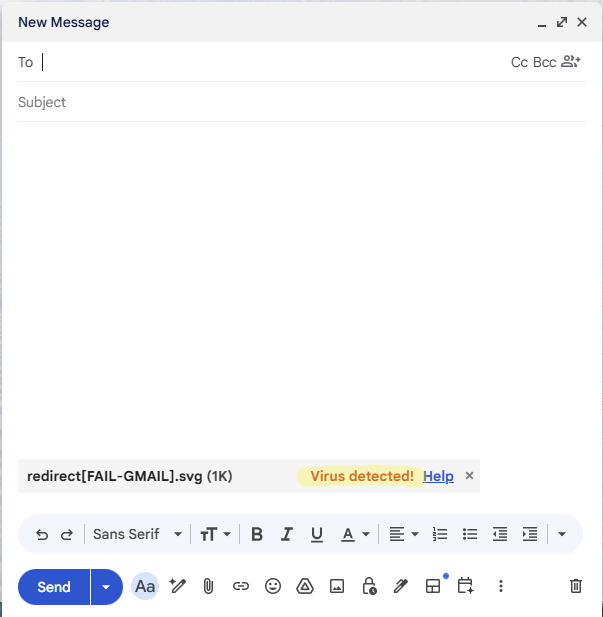
As part of my payloads testing against popular providers, I encountered an attachment block in Gmail. Accompanied by a “virus detected” label when attaching the file, Gmail prevented my payload from being sent. It was surprising to discover that Google blocked a malicious SVG file attachment in the compose window, which is not a common feature among email providers.

This sparked my curiosity and led to a deeper examination of these mechanisms to discover a way around this limitation.
The Gatekeeper: File Handling in Google Workspace
Both Gmail and Google Drive have file handling mechanisms to prevent their tools from being used to distribute malicious files.
While exploring these mechanisms with various payload types, I encountered two blocking responses in Gmail: “Virus Detected,” which means the file was found to be malicious. And “Blocked for security reasons,” which indicates a forbidden file structure (such as an executable or a macro-enabled document) or similar, intended to prevent the sending of potentially malicious but undetected files.
When using Gmail web client, it labels the attachment during composing and prevents the mail from being sent with it.
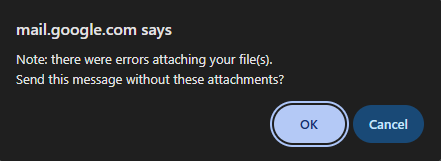
Gmail also scans and blocks emails from being sent to their users inboxes even if the sender client is not Gmail’s client. Other mail clients (e.g., Outlook, Amazon WorkMail) didn’t flag this payload, so while the email can be sent, Google detects it server-side and blocks it before delivery.

Google Drive has a scanning mechanism as well, which marks malicious files as “Flagged for abuse” and prevents anyone but the author from downloading them. It also provides an additional warning interstitial that alerts users before downloading any potentially harmful file types like executables or scripts, adding a layer of protection and clarifying the risks of proceeding.

The Systemic Setting: Platform-to-Platform Integration
Google Workspace (Google’s cloud productivity suite, including Gmail, Drive, Docs and more) has a feature that allows native sharing of Drive files within Gmail emails. It relies on shared services integration and the fact that it can access the attached file to embed the Drive share links into the email body, making them look and behave like traditional attachments rather than plain URL links from any other third-party service.
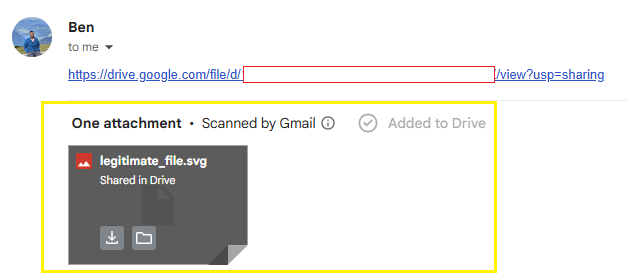
Since this feature is link-based and email content can be visibly manipulated, the link can be strategically concealed from the human eye and the feature will still work, significantly boosting the email’s credibility.
The flaws I discovered leverage this feature as a way to bypass Google’s native security mechanisms, let’s dive into it.
Gmail’s Files Scanner Bypass
Back to our blocked SVG: I had a malicious SVG sample that Gmail flagged as “Virus Detected” and outright blocked it from being sent. The challenge, of course, was figuring out how to overcome this digital sentinel.
A common way to bypass email attachment blocking is to upload the malicious file to a file-hosting service (like Dropbox or Mega) and share via a download link. This avoids provider file scans, and the link typically passes reputation checks. However, it diminishes the email’s credibility significantly.
So how can we bypass the scanner and still maintain our credibility? This is where Gmail’s own Drive attachments feature came to our aid!
I used Google Drive as a hosting platform. My SVG payload, despite being flagged as a virus by Gmail, was successfully uploaded to Google Drive and configured to be accessible to anyone possessing the share link.
Contrary to Gmail’s detection, Google Drive did not classify this file as malicious. This shows an architectural misalignment between the two scanning mechanisms which plants the seeds for this vulnerability.

I could then compose the email, with the share link from Drive, which was not scanned again by Gmail, and send the email normally.
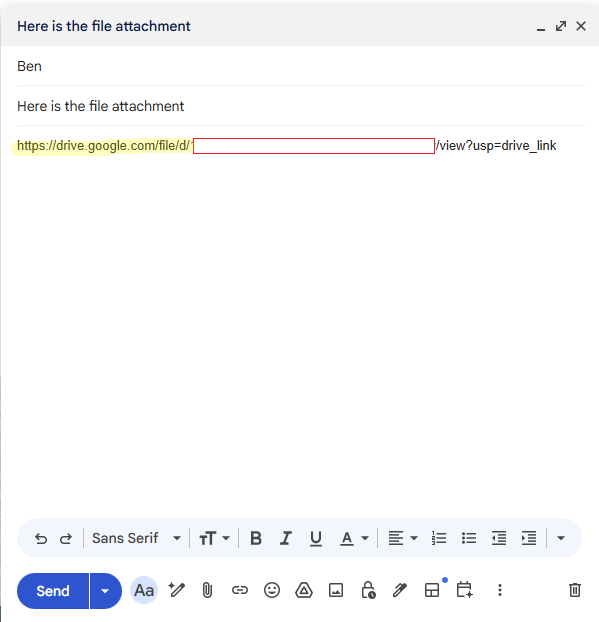
Speaking with the broader Pentera Labs team, we hypothesize that this discrepancy stems from a fundamental divergence in threat modeling between the two services. While from a file-host perspective these files might be harmless, from an email provider perspective – they might conceal a risky phishing vector.
The critical logic flaw lies in the integration: Gmail appears to extend implicit trust to files originating from Drive. By assuming that content within the internal ecosystem is pre-vetted, Gmail bypasses its standard verification steps, allowing the malicious payload to inherit the ‘safe’ status of its storage container.
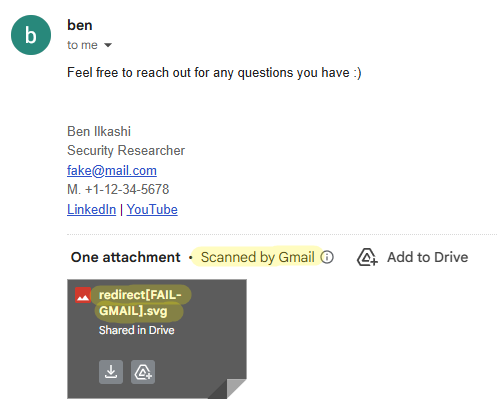
Upon receipt, the email displayed the file as a standard attachment rather than a link to external hosting, identical in appearance to a legitimate attachment, and included the “Scanned by Gmail” label.
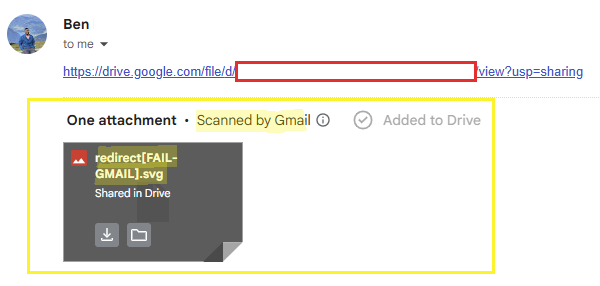
This label is falsely displayed as we saw earlier that Gmail’s scanners had identified this file as a virus, when not uploaded to the drive.
I found that the recipient was able to download and execute the file successfully, confirming its functionality as a delivery vector via Gmail, despite its initial blocking by Gmail’s transmission scanner.
By uncovering and exploiting the gap between Drive’s and Gmail’s scanning logic, I successfully delivered a blocked threat that arrived and displayed not as a poorly suspicious link, but as a native attachment validated by the very system designed to block it.
Proof of Concept
This example utilizes the mentioned SVG payload that employs a redirection mechanism to direct unsuspecting recipients to a phishing website.
For the purpose of this demonstration only, the redirection is set to a self-created phishing mock; however, this could be readily modified to initiate a comprehensive phishing campaign leveraging Gmail as a credible delivery infrastructure.
I used a simple text manipulation to showcase the social engineering possibilities attackers have exploiting this flaw.
PoC Video – Scanner bypass
Utilized SVG file –
<svg width="200" height="200" viewBox="0 0 200 200" xmlns="http://www.w3.org/2000/svg" xmlns:xlink="http://www.w3.org/1999/xlink">

<script>

window.location.href ="https://pentera.io/pentera-research-labs";

</script>

</svg>
Drive’s Incomplete-Scan Warning Circumvention
My curiosity following the initial discovery led me to wonder what other discrepancies existed in this integration and what would happen if a payload was not detected as a virus by Gmail. As described above, executables that had not been detected as viruses, were “Blocked for security reasons” in Gmail. Google itself suggests to upload the file to Google Drive and share it, if you believe the file is safe:
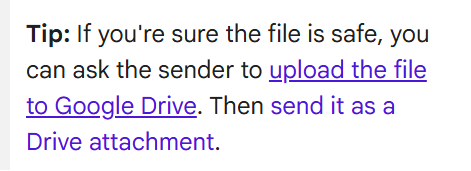
This suggestion might stem from the same divergence in threat modeling between the two services, as Google Drive acts as a file-hosting service, it might treat payloads scanning differently than Gmail.
But what happens if Google Drive does not flag your malware as “Flagged for abuse” is it considered to be safe? Not exactly.
Google Drive also displays a warning interstitial – a dedicated window/popup that warns the user from downloading a suspicious shared file:

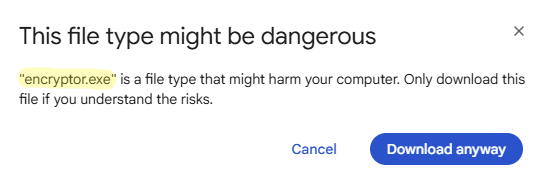
This warning message is crucial because it indicates an incomplete scan of the file by Google, a circumstance that significantly increases the user’s risk upon downloading and executing it.
This warning obviously undermines delivery credibility. But could it also be bypassed?
I created a sample that was not recognized as a known virus in Gmail or Drive and uploaded it to Drive. These types of malware might not be recognized because of anti-detection mechanisms like obfuscation, or lack of detection signatures for specific malicious actions.
It is noteworthy that this sample was marked by Gmail as “Blocked for security reasons” not “Virus detected”, and was not labeled as “Flagged for abuse” in Drive.

the file is recognized as “Blocked for security reasons” by Gmail

the file is not recognized as known malware by Drive
I attached the Drive share link to an email and sent it as before.
Again, upon receipt of the email the file was presented as an attachment, and was immediately accompanied by the “Scanned by Gmail” label.
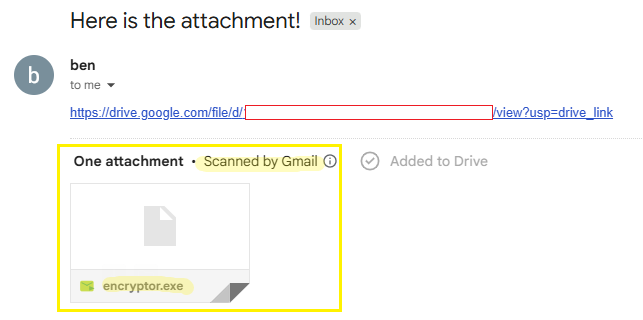
This time I uncovered a different atypical behavior. The expected warning interstitial was completely missing. I could download the file in Gmail’s endpoint (mail.google.com) directly from the email and from the file preview, without any warning page or popup.
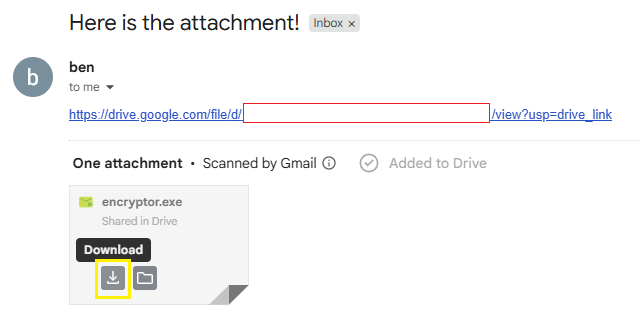
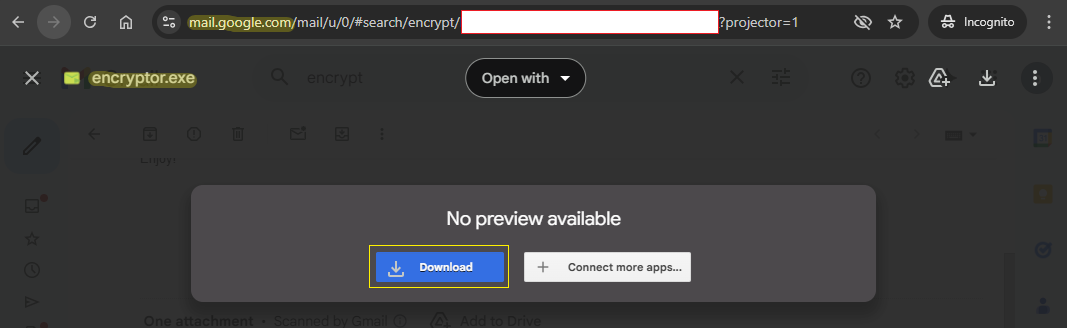
The warning screen was only displayed upon opening the link itself and attempting to download the attached file directly from Drive endpoint (drive.google.com).
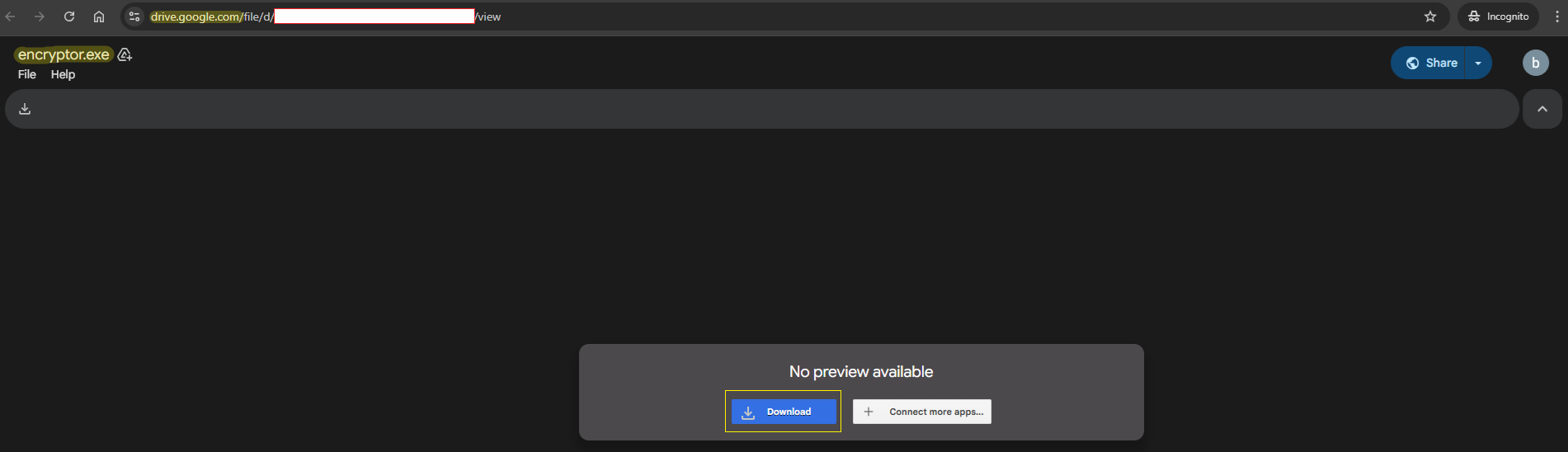

This indicates a flaw in the implementation of the Google Drive file download mechanism within Gmail’s endpoint that eventually allows users to download files that have not been appropriately scanned without triggering Google’s standard safety warnings.
This finding reinforces the fact that Gmail’s and Drive’s file handling mechanisms are not aligned. This misalignment allows attackers to identify gaps, such as those presented in this article, and exploit them so that Google’s services effectively serve as a convincing and trustworthy delivery infrastructure.
Proof of Concept
The example utilizes a crafted ransomware executable that employs a xor based encryption as a payload.
For the purpose of this demonstration, the ransomware will search and encrypt a file called encrypt-me.txt in the same directory. However, this could be easily modified to initiate an infinite end-to-end attack vector, utilizing Google’s products as a credible delivery mechanism.
I used a simple text manipulation to showcase the social engineering possibilities attackers have exploiting this flaw.
PoC Video – Warning bypass
Conclusions
The research presented here uncovers a significant architectural flaw within the integrationbetween Gmail and Google Drive. We have demonstrated two distinct logic flaws, eachundermining a different security mechanism, suggesting that further security issuescan possibly arise, due to the inherent complexity and the implicit trust in the integratedarchitecture of Google Workspace services.
Upon disclosure, Google confirmed the validity of the flaws and acknowledged the report asa duplicate of an existing tracked issue. The fact that the issue had already been identifiedindicates that it is not an isolated or theoretical edge case, but a reproducible architectural gap. If it can be discovered through security analysis, it can also be identified and leveragedby motivated adversaries.
The risk in attackers exploiting this gap as a delivery vector extends far beyond corporate environments, posing a significant threat to nearly every individual with a Gmail account.
By leveraging Google’s trusted infrastructure, attackers can deliver highly convincing,malicious payloads directly to the inboxes of the general public, where user vigilance againstofficial-looking warnings is typically lower, making this a pervasive security threat.
**Update**
Following publication, Google re-evaluated the original report and changed its status from duplicate to accepted. The issue has now been assigned its own bug, with a medium impact rating and high exploitation likelihood. This reassessment suggests that the finding is being recognized as a distinct issue, rather than a previously known issue. It also reinforces our confidence in how Google is handling the report. While we remain hopeful for a fix, no public fix is available at the time of writing.
Mitigations
As of this publication, Google has not released an official fix or documentation addressingthese flaws. By publishing this research, we aim to inform both users and defenders, ascurrent mitigation depends solely on organizational vigilance and user awareness.We encourage security teams to treat this post not just as a vulnerability report, but as aresource for building compensative controls. Until an official resolution is implemented, we recommend:
- Increase “Safe” Labels Awareness:
Treat emails containing Google Drive links or attachments with the same caution as thosewith direct file attachments, regardless of the “Scanned by Gmail” label. Educate employeesin your organization to verify the source even if the safety label is present. - Enforce Real-Time Download Sandboxing for Google Drive Share Links:
Configure secure web gateway or browser security solutions to automatically interceptand detonate files downloaded from external cloud storage platforms such as Google Drive.By suspending the download until sandbox verdict completion or delivering a sanitizedextracted copy, security teams can prevent execution of malicious payloads even whenphishing emails successfully bypass native Gmail scanning and leverage the safe labeling. - Enforce Native Content Compliance Rules for Google Drive Share Links:
Configure native Gmail content compliance rules to identify and modify emails from externaladdresses containing Google Drive share links. Remedial actions, such as adding subjectwarnings, redirecting for review, or quarantining, can disrupt user trust in the “Scanned byGmail” label and prevent immediate malware interaction.
Effective security starts with awareness. By understanding the mechanics of these flaws, defenders can better address the gap that the software architecture currently presents.
Responsible Disclosure Timeline
- December 14, 2025: Reported the vulnerabilities to Google via the Google Bug Hunters program.
- December 15, 2025: Google Trust & Safety acknowledged receipt of the report and indicated it was a duplicate of an internally tracked issue.
- January 22 2026: Requested an update regarding remediation and publication status. Google Trust & Safety responded that no fix timeline was available and that the decision regarding disclosure timing was ours.
- February 11, 2026: Reached out to Google Trust & Safety to coordinate publication following
the 90-day disclosure period. Google requested a draft for review in advance. - February 19, 2026: Shared a draft of the disclosure with the Google Trust & Safety team for review.
- March 3, 2026: Followed up with Google Trust & Safety ahead of the planned publication. Google responded that they had no feedback on the draft and appreciated the coordinated disclosure process.
- April, 2026: Published this blog post following the 90-day responsible disclosure period.
- May 21, 2026: Google Trust & Safety team changed the original report’s status from duplicate to accepted, and qualified the issue as an abuse-related methodology bug with medium impact and high exploitation.